An AI Vision Skill to Fix PDF Accessibility
Originally shared on LinkedIn (opens in a new window), 2026-06-05.
Last week I read Edsger Dijkstra's Go To Statement Considered Harmful. It's a 1968 letter to the editor of Communications of the ACM — a page of typewritten prose that fundamentally shaped how my profession thinks about program structure. Every computer scientist of working age has at least heard of it. Many have read it. Few have read the actual original document.
If you're a sighted scholar with a reasonable connection, you can pull it up from the ACM Digital Library in about ten seconds and read it.
If you're a screen-reader user, you can't. The PDF is a scan. There's no text layer. There's no structure tree. There's no alt text on the figures. It's possible to fix all of that manually using OCR to scan the text in Acrobat Pro, fixing the typos, tagging the document, fixing reading order, writing your own alt text (assuming you can see the images). It's not fun though, it's time consuming, error prone and the tool you use does not come cheap. And if you rely on Acrobat, then you will likely have the same document visually that you started with, and that visual presentation itself may not be accessible.
This isn't just about that one letter from Dijkstra, it's about thousands of foundational papers across computer science, sitting in an academic database that are technically published but operationally unreadable for many disabled scholars.
I work in accessibility at CNIB Access Labs where inaccessible documents are part of my professional problem. The inaccessibility of documents from my own discipline, my own professional association, are a personal affront.
Previous experiments
I've taken several runs at this over the years, and the results have always been disappointing. The big problem was the quality of many of the scans.
If you remember photocopying books where the text curved unpredictably at the spine, or where the book was at an angle when scanned, or the copy you were scanning was faded, that is what many of these documents are like. They are also old in presentation style. No nested lists: lists go "1,2,2a,2b,2c, 3", and may even have mid-page footnotes. They also include hand-drawn figures, and sometimes handwritten maths equations and those figures don't always respect the column layout of the page. They are also sometimes in very old fonts. And all of that makes the task of Optical Character Recognition (OCR) extremely difficult.
My own attempts used a programming library called Tesseract, which performs reasonably well if the fonts are clear and relatively modern. Older fonts, designed for hot metal printing were more of an issue and I ended up creating a training model to teach my scanner how to read some of the glyphs. This improved the accuracy of the scans but it was seldom perfect. Having done that, I then needed to identify blocks of content reliably and build a reading order. The process always left a lot of manual clean-up.
Even now, if you ask Acrobat to scan one of these documents to extract the text, it can produce gibberish if there are issues with the scan. This is the part of the reference section of the Dijkstra letter generated by Acrobat Pro (their accessible text output):
L WrnTH, ::S.1Kr..n·s,.\NO Ho.rnE, C. A. R. A contribution to the \dc'velopmem of ALGOL. Comm. A CJ.If} (June 196G), -U8-482.
OCR is just one part of the problem. Accessibility doesn't mean "the text can be selected." It means structure: headings tagged as headings, lists tagged as lists, tables tagged with header cells in the right scope, figures tagged with alt text, reading order matching the visual flow, language metadata so the screen reader pronounces things correctly, fonts that have the actual glyphs for what you typed, mathematics properly interpreted and reproduced. The text-extraction part is maybe 20% of the work. The other 80% is reconstructing the document's semantic structure from a 60-year-old scan that has none.
Why now?
What changed this time was the availability of high quality AI vision. Specifically: large language models that can look at a rendered page image and reason about it semantically. Not "what characters are in this region" — that's OCR — but "this is a heading; this is a continuation paragraph; this image shows a figure that depicts a sequential machine; this section has nested numbered sub-items; this table is a layout grid for laying out a form, that one is a data table with column headers and meaningful row relationships." That semantic layer is exactly the 80% that was eating my previous attempts.
So I decided to try something different. I decided to build a skill that approaches document remediation on a case-by-case basis reacting to what is discovered, rather than a complex rule-based algorithm that tried to capture and support every edge case, which is where my code was at that time.
What we built
I built — or rather, I worked with Claude to build what is now a Claude skill: a packaged combination of natural-language instructions, deterministic Python tooling, and tests, that turns an inaccessible PDF into both a properly tagged Word document and a PDF/UA-conformant PDF 2.0 document.
The skill architecture has two parts:
-
Claude does the judgment. It looks at each rendered page image and decides what's a heading, what's a body paragraph, what each figure shows, whether a table is a layout grid or a true data table, what the inline subscripts should be in math expressions, what alt text describes the diagram. The kind of decisions a human accessibility remediator makes by looking at the document.
-
A small Python toolchain does the syntax. Writes valid OOXML for the Word output, builds a PDF 2.0 with proper struct tree (and AcroForm widgets, out of scope for these historic PDFs), embeds a Unicode-capable font subset so to ensure that subscripts and maths symbols actually render, attaches alt text in the right places, gets the reading order right.
Neither half could do the work alone. Asking the LLM to emit valid OOXML or build a PDF struct tree end-to-end produces subtle bugs you can't reproduce — and PDF/UA conformance has roughly 130 checks, any of which can fail silently. Asking deterministic Python to recognize "this image is a half-page rendered scan of a numbered list with nested sub-items in mid-century typewriter style" is asking it to do magic. The split — judgment to the model, syntax to the code — is what makes the pipeline work.
Generator options
The skill, once loaded into Claude sits waiting in the background to be called on by Claude depending on user interaction. To fix a PDF, the file is loaded into a message (the Claude.ai application is conversational AI where the user types messages to Claude and can attach documents and folders to the message) and Claude is prompted to "please fix this document for accessibility". Claude uploads the document AND determines what skills it requires, finds ours (/accessify-pdf), builds a task list based on the skill and begins inspecting the document.
Having inspected the document, Claude will ask some questions: do we want Word, or Word and PDF? What title would we like with defaults offered from the already inspected document. It also asks whether we wish to keep the existing multi-column format, if it has one (most ACM research papers are multi-column but not all), or adapt to a single column, more accessible layout. Also, because these are old research documents that don't follow current standards, Claude will also suggest keywords, and a synopsis to add to the document. Once those questions are answered then the process of generating first the intermediate, and then Word and PDF documents begins. There may be more questions asked depending on the issues Claude encounters.
Two document formats: Word and PDF
The skill generates two accessible documents, one in Microsoft Word, and one in PDF. This was initially to help with debugging. When we got strange behavior or layout issues in the generated PDF, we could look to the generated Word document to help understand the issue. In the end having a Word output was so useful that it became a first-class output of the skill that you can generate without the PDF. Having an editable Word document is intrinsically more accessible than the fixed format PDF document in any case, because the reader can mark up, add/modify/delete, and completely restyle content to make the document work better for them.
The iteration
The substantive part of the work was iterative. Every accessibility issue we found was in a real test document — and we used real ones, starting with a 1960 paper by Gerald Estrin on early computer architecture and moving on through several others, including the Dijkstra letter. Each became a diagnosis, a fix, a regression test, and the next patch version. We went from version 0.5.25 to 0.5.40 over a few days of working sessions, each release closing one or two real defects.
A few of them, because they're concrete enough to be interesting. They also show how much regular programming is inside the skill, it's a long way from a simple collection of prompts:
Tofu boxes on subscripts. Early outputs showed chemistry-style expressions like "H₂O" rendered as "H□O" — the subscript glyph was a black square. The cause turned out to be two layers stacked. The embedded font (reportlab's default Helvetica) didn't have the subscript glyphs at all, AND the previous code had emulated subscripts using a hack from the pre-Unicode era — switching mid-string to ZapfDingbats and drawing a regular letter, which produces a dingbat shape that happened to look subscript-ish in older viewers. We bundled DejaVu Sans with proper Unicode coverage as the embedded body font, removed the ZapfDingbats hack, and added explicit <sub> / <super> markup support to the intermediate representation (the PDF builds into an intermediate HTML-like document that both the Word and PDF docs build from) so that Claude could express subscripts cleanly.
Numbered list labels colliding into body text. With a 13-item references list, the output showed "10PHILCO-TRANSAC" — the "10." label running directly into the "P" of "PHILCO." The label column was sized for one digit. Fix: measure the widest label at construction time and reserve column width based on the actual font width, not a fixed indent. Bullets stayed at the small indent because they're drawn as a graphics primitive at a known position.
Numbering restarting at 1 across page breaks. A long bibliography ended at item 9 on page 1, then continued on page 2 starting at... 1. The list rendering object had no split-across-pages method, so the underlying layout engine fragmented the list and the continuation half lost its starting offset. Fix: implement a split that breaks on top-level item boundaries and carries a start-index to the continuation. Also added a start attribute on the IR so Claude could express continuations explicitly when the source had a section break interrupting a logical list.
Old typewritten numbered formats. The Estrin paper used (1), (1a), (1b), (2) — a mid-century convention that predates modern nesting of lists. Modern convention is hierarchical decimal: 1, 1.1, 1.2, 2. Two fixes. Generator side: nested ordered lists now emit hierarchical decimal labels in both PDF and Word. Model side: SKILL.md tells Claude to recognize the old pattern in source PDFs, convert to nested ordered structure in the IR, and rewrite any in-text references like "see (1b)" to "see 1.2" to match the new labels while still retaining the original numbering as side-by-side annotation for historical accuracy.
Headings stranded at the bottom of pages. The Word output had H2 headings with no following content on a page — the body broke to the next page and the heading stayed orphaned. Two causes. The generator was auto-inserting a hard page break between every internal "page" of the IR, AND the paragraph after a heading didn't have Word's "keep with next" flag set. Fix: remove the auto page breaks, add keep-next chaining on heading→paragraph pairs, and turn on widow/orphan control on every paragraph. Also added an explicit page_break_before attribute on the IR so Claude can force a break when keep-with-next chaining isn't enough.
Source fonts being stripped to Arial. The Word output kept reverting to Arial for body and headings even when the source used something specific (Aptos Display + Aptos with a dark blue heading colour in one Microsoft-authored document). There was no accessibility reason to force Arial — that was just the safe default we were over-applying. Fix: optional fonts object on the IR carrying body family, heading family, and heading colour. When present, those flow into the document's styles. When absent, Arial fallback. SKILL.md now tells Claude to identify and preserve the source's typography unless there's a real accessibility reason not to (overly thin display fonts, poor character distinction, etc.).
A PDF audit check that was just wrong. One of the issues we hit early on, was that the standard libraries and tools that the python toolchain relied on were imperfect generators of Word and PDF. Since we couldn't fix those third party libraries and tools, we needed to first build our documents and then audit them for accessibility and remediate our own output. Consequently, a large part of the coding was generating an internal PDF accessibility auditing tool that tests against PDF/Matterhorn requirements. We ended up with over 200 individual tests, and some had issues. One of those was "reading order matches visual layout". The test worked well within a page but broke on page boundaries.
The pattern across all of these: real-world documents are full of edge cases beyond our original prototype that can expose underlying issues with the skill, allowing us to tighten Claude's instructions (so it makes better decisions) and/or tightening the deterministic code (so the syntax holds up under what Claude produces). Essentially we trained Claude on a wide range of real-world instances, and amended our toolchain iteratively to improve the skill.
Dialog excerpts
In addition to the two formal outputs: accessible Word and PDF documents, we get to see Claude's thought processes at work (or at least as much as it exposes) as it explores the source PDF and builds those outputs. You will see the AI model at work on the maths in particular. Examples include:
The source was a 13-page 1959 conference paper (typewritten two-column scan, OCR'd but untagged) — heavy on equations, with two flowcharts, two large tables and four figures.
Judgement calls to be aware of: the two-column layout was reflowed to a single column; Flow Charts I and II and Example E were transcribed as structured lists (screen-reader navigable) rather than images; Table II and two tall Appendix B tables were split into parts to fit the page. I preserved several apparent misprints from the 1959 original as printed — e.g. "Store T(134) = 11" (the arithmetic gives 2) and "11(0+1+2) = 23" (gives 33) — rather than silently correcting them.
The source contains apparent misprints I preserved verbatim: "Store T(134) = 11." (its own table and Example C compute 2), the partial sum "44" in the T(12345) table (the arithmetic gives 34), and Table II's printed 265720 / 27648528 (true Stirling/Bell values are 261625 / 27644437).
Binomial coefficients in Eq. (12) are written as "(6 choose 3)" since stacked notation isn't reproducible; Example E's arrow diagram became a numbered stage list with the X markers kept.
What I learned
Building this gave me a few takeaways I didn't fully expect.
AI "skills" build iteratively and they're guided software, not prompt collections. A skill is instructions plus tools plus tests, and you ship it the same way you ship any other software: find an issue, diagnose it, write a test that captures it, fix it, version-bump, ship. The most useful mental model isn't "magic AI" but "an unusually polite junior engineer who reads its instructions every time and never gets tired of being both inventive and corrected." That junior engineer happens to be good at vision tasks and at generating natural language. We leverage that, but write the rules down.
Claude is a great collaborator for building Claude skills. That sounds circular, but it isn't. I built this skill with Claude — having it write code, write tests, write the SKILL.md instructions, diagnose failure cases, propose fixes, surface trade-offs I hadn't thought of. The pattern of "I see this bug, let's understand why it happens, let's write a fix and a regression test, let's bump the version, let's commit and push" is exactly what an LLM is good at. The skill ended up being roughly 30 patch releases over a week, each with its own tests, changelog entry, and commit message. None of that would have been tractable as solo work in the same timeframe.
Output that looks fine isn't the same as output that's accessible. This is the bit I'd want anyone working on document accessibility to internalize. Font embedding, hierarchical numbering, alt text on every figure, the multi-channel announcement of form-field hints (PDF /TU and /Contents and Word's <wp:docPr descr=…> because Firefox+VoiceOver reads one channel, Adobe Reader reads a different one, and NVDA reads yet another), table headers with proper scope attributes, language metadata, embedded fonts that include the codepoints you actually used, reading order that survives both pdfminer's layout reconstruction and PDF.js's accessibility tree — each one is a small fix individually. Cumulatively they're the gap between "this document looks fine on Preview" and "this document works for someone using NVDA, JAWS, or VoiceOver across Acrobat, Preview, and Firefox+PDF.js."
You need to read the output of Claude. As it works, as it makes assumptions, as it makes judgement calls. There is certainly less manual clean-up at the end than my earlier attempts, but there are still decisions to review and sometimes errors to correct or further guidance to give.
That leads to one additional observation: because document remediation is a conversation and not a script, we can interrupt, clarify, give additional guidance in ways traditional software programs cannot.
The result
The skill takes a scan downloaded from the ACM Digital Library and, usually in a few minutes of vision-and-Python work, produces both a Word document and a PDF that pass almost all of the PDF/UA accessibility checks in our internal auditor tool. The Word file opens in Word and reflows properly and passes the Microsoft Word accessibility checker; a screen reader user navigates it by heading, jumps to references by list item, reads alt text on figures, and by the bookmarked headings/table of contents. The PDF passes Adobe's built-in accessibility checker. The reading order works correctly in Firefox+VoiceOver.
Is it perfect? No, and see below for examples but more generally, vision-based structure analysis has failure modes — column detection in unusual layouts, math typesetting where the source uses a non-standard convention, low-contrast scans where OCR struggles before vision even gets started. For the documents I've tested it on, the failure modes are recoverable: they are either obvious in the text, Claude surfaces uncertainty in its summary, and you can hand-correct the intermediate representation or through further instruction to Claude before the document is finalized (conversation not program).
What failed
-
There are documents that are just doomed to fail. Documents where the scans are missing text at the edge of the page because the book spine caused text to be compressed or twisted badly.
-
The stranger fail has been with the content of documents, particularly Dijkstra's letter on "Go To considered harmful". When I upgraded to the newest Claude Opus 4.8 model, Anthropic's security system stepped in and blocked generation. It looks like the word "harmful", possibly stemmed to "harm" in the content of criticism of the programming feature triggers their security alerts. Whilst I understand the need for content moderation, this example demonstrates how overly restrictive the implementations currently are.
-
Mathematical formulae, especially if there are hand drawn elements can be poorly transcribed e.g.
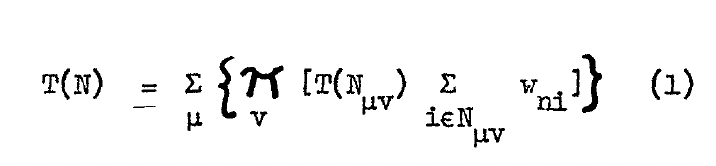
The generated result was:

Note (1) how the second level of subscripts (the μν) get confused. When those additional hand-written elements are not there, and complexity is lower, they tend to work, but where there is certainly a level of clean-up required and I find I have to give further instruction to Claude in the conversation and let it try again.
Note (2) how formulae tend to get inlined with the text. This is despite instructions in the skill to preserve document layout around formulae as much as possible and again, I find I have to give explicit instructions to Claude to remediate this.
Note (3) how the ν below the hand-drawn Π has become a subscript of Π. Perhaps that was how it was meant by the author, but it's not now it is drawn.
Overall, a good effort, but not correct.
- Rendering of formulae in Word is worse than in PDF. There is a recurring, if infrequent bug where the Intermediate Representation (IR) appears without translation directly in the Word document and Claude needs to be prompted to go fix. Using the same formula example from above (note that you can also see the second-level subscript issue in the IR):

What's next
The iterations continue as I try more PDFs, and form handling too, dealing with the frustration of being given inaccessible paper forms to complete and sign.
Hopefully, I'll be presenting this work at conference sometime this year— talking through the iterative build, the diagnostic stories, the honest assessment of where AI is good enough to ship today and where you still need a human in the loop. The talk is provisionally titled Creating a Claude Skill to Remediate Old, Scanned PDFs — Lessons from Iterating on a 1960 Science Paper.
If you're working on accessibility remediation in your organization at volumes where manual remediation isn't tractable, this approach may be useful to you, please contact me if interested.
And if you're a screen-reader user with an academic interest in some specific old paper or archive that nothing has been able to remediate well — drop me a note. I'd love to try it on more real documents. The point of the work is to make that body of inaccessible scholarship readable to people for whom it has never been readable, and that's a better motivator than any audit-conformance number I could quote.