Using local vision AI models to find all the headings on a web page
Originally shared on LinkedIn (opens in a new window), 2025-06-16.
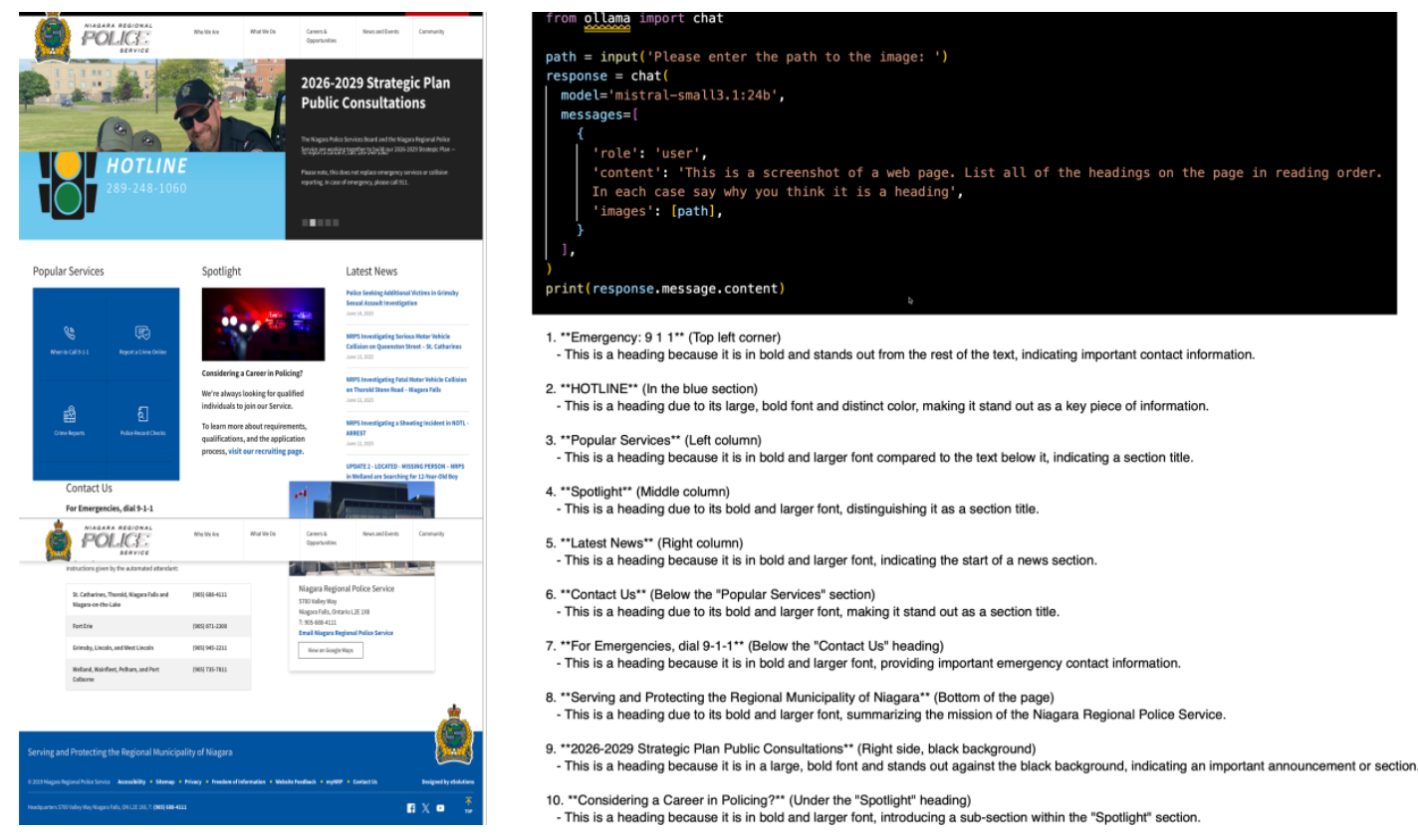
Previously I've written about using a local copy of AI on your laptop to test for accessibility issues on web pages, and demonstrated testing for the dominant language. This time we are going to identify likely page headings using local AI vision models.
So, why would we want to do that? Existing regular automated accessibility checkers do already test for missing <h1> headings, out of order headings, and sometimes oddly positioned headings. What they don't do so far is identify apparent headings on the page that aren't properly marked up as headings. Finding those is left to manual inspection.
One of the key manual inspection techniques uses an accessibility bookmarklet (a piece of JavaScript applied to a web page in a browser to visually tag hidden html) to tag those pieces of text on a page that do have heading levels defined; a tester then manually inspects the page looking for headings without a tag. A miserable and error prone test, and requires human intervention for every single page to be tested.
"List all of the headings on the page in reading order"
It would be so much easier were you able to ask AI simply to list all the headings on a page, or better still describe which ones are marked up, and which ones aren't. That is what I set out to try this week. At least, to gather the first part.
If running AI models on your personal computer to capture issues in source code is cutting edge, then finding the issues through inspection of screen-shots is bleeding edge, and few models small enough to run on a laptop (I used a MacBook Air for this experiment) produce quality results. The issue is that we are not only asking the AI to reliably find text on a web page, but to then consider it in terms of its visual properties, and its relationship to other content (text and images) on the page. It's a big ask for relatively small LLM's.
The actual task I gave was:
This is a screenshot of a web page. List all of the headings on the page in reading order. In each case say why you think it is a heading.
I asked for reading order, partly because I wanted to understand how AI perceived the page, and partly to compare the result to existing automated test tools which I would expect to work through a web page in the order of declaration, which is reading order for screen-reader technology. I also asked it to justify why it thought something was a heading to better understand the approach and perhaps any errors produced.
Query by API
The text prompt, of course, requires an image to work on and the easiest way to upload an image to AI is through an API, and let code libraries deal with conversion to Base64 data. Since I also want to bring this back to my original open source automated test tools (see Github bobdodd/carnforth) it also made sense to begin to interact via API.
I choose to run my LLM's locally using Ollama.com, a platform that allows multiple models to be hosted locally and accessed through a common API, meaning I can use the same API calls across a wide range of models/suppliers. The python script used is shown in the hero image at the top of this article and the original script can be found in the examples section at GitHub ollama/ollama-python.
Test Page
For a test page I chose The Niagara Region Police Service home page as it is visually well structured but with challenges for screen capture. Specifically it has headings inside a carousel. Consequently, I knew going into this testing that a single screen-shot will not find all headings, we would need multiple screenshots timed to coincide with slide advancement.
Varying Quality of Results
Seven different vision models supported by Ollama were tested against the same prompt of varying age, size, and number of parameters:
- granite3.2-vision:2b [3 months ago] (2.4 Gb)
- llama3.2-vision:11b [3 weeks ago] (7.8 Gb)
- llava:7b [1 year ago] (4.7 Gb)
- llava:13b [1 year ago] (8 Gb)
- minicpm-v:8b [6 months ago] (5.5 Gb)
- mistral-small3.1:24b [4 months ago] (15 Gb)
- qwen2.5vl:7b [3 weeks ago] (6 Gb)
Mistral-small3.1:24b
The most performant of the models was Mistral, which given the 24 billion parameters is no real surprise. It was added to the list as a datum to compare the smaller models with. It produced a near-perfect list of headings, but it did take 3.5 hours to do so (MacBook Air with only 16Gb of memory).
The full list of results from Mistral is showing in the hero image at the top of this article but in summary:
- Mistral identified 10 potential headings in a recognizable reading order reading top left to bottom right of the page, column by column.
- The first heading selected was the Emergency: 9-1-1 at the top left of the page (found by most models, but not llama3.2-vision). I would perhaps quibble with "Emergency: 9-1-1", as the heading is Emergency and the contact to call is 9-1-1, otherwise there is no content for the heading. The justification given was, "This is a heading because it is in bold and stands out from the rest of the text, indicating important contact information."
- The general order of headings then followed the left margin until the three tabbed columns and followed each in order-left to right before continuing to hug the left margin until the bottom of the page. Only then did it go to Strategic Plan Public Consultation.
- Mistral was one of two models that managed to deal with headings wrapping onto the next line e.g. "Strategic Plan Public Consultation" where most models only reported "Strategic Plan", the other being llama3.2-vision.
- Mistral appeared to use size, weight, and colour of text relative to the following text in determining if it was a heading.
llama3.2-vision
The only model that came close to the quality of Mistral, was llama3.2-vision, another larger model at 7.8 Gb and only three weeks old.
This model found most page headings, repeated one heading, missed the "Emergency 9-1-1", and chose a reading order that began with the 3 tabbed columns and moved down before moving back to the top. In terms of reading orders, it seemed to decide that those three columns were the most prominent content on the page and worked away from there. If the entire page is visible to the user, there may be a case to be made for this approach, with content scrolling on a web page, less so.
The major difference between Mistral-small3.1:24b and llama3.2-vision was speed: llama completed the task in only 3 minutes whilst mistral took 3.5 hours. It also only requires 7.8 Gb compared to 15 Gb.
As a test, I increased the complexity of the ask for llama, and asked it to report the headings in a left-to-right, top-to-bottom form more representative of screen-reader order. 75 minutes later the model crashed completely, stuck in a loop traversing the same few headings until it finally ran out of tokens.
Hallucination
Both llava models experienced hallucination, inventing headings, for example "gifts" and "galleries". It was notable that they both produced poor quality results, in addition to the hallucination. One cannot put the hallucination down to model size or number of parameters, neither were the smallest models used but were the only models to hallucinate.
No surprises
Looking at the seven models as a whole, no real surprises were evident. The larger the model, generally the better the quality. The newer the model, the better the quality.
Generally there was less difference in performance speed between models up to 7 billion parameters / 8 Gb size with 2-3 minutes being common. Mistral at 24 billion parameters and 15 Gb was exponentially slower at 3.5 hours. This is understandable given the laptop only had 16 Gb, of which 15 Gb was taken up just by the model itself. Other available models were simply too large to even try given the 16 Gb limit.
Speed vs. Performance
Given that we want to find all of the potential headings on a page, in order to compare with the HTML heading markup for a page, accuracy is important, and only one model, Mistral, succeeded to a degree acceptable; with those results we could indeed find apparent headings that were not marked up correctly. But... 3.5 hours on a small 16 Gb laptop.
If we were to accept that we won't find all headings, just most, would that still be useful? I would say, yes potentially. If we are automatically scanning a representative set of web pages periodically for a website, then 3 minutes per page to catch most of the headings seems useful. That would be a page every three minutes, 20 pages per hour. Is it as good as Mistral catching 100%? No, but much better than not catching anything because the alternative is expensive manual inspection.
Of course, in practice, one would want to use a much more powerful machine to run the local AI models than a little MacBook Air, and those 3.5 hours per page may be down to a minute or less, but the argument still holds in that we would fly through hundreds of pages using llama in the time it would take mistral to test one, so the sample size could be 100%. Even though the quality per page is lower, many more pages would be tested.
Better Models
The testing undertaken deliberately used small LLM's that can run on a small 16 Gb laptop to try and be representative of what accessibility professionals are likely to have to hand. We have seen that even relatively small 7.8 Gb models can produce reasonable, if not perfect, results and that a noticeably larger 15 Gb (24 billion parameters) model aces the task, allowing for speed.
Imagine how much more can be done with larger vision models such as llama3.2-vision:90b (90 billion parameters) model if we have the 55 Gb of memory required? We would be able to query not only what headings were on the page, but we could consider layout, use of whitespace, prominence, relevance of images to the nearby text. Much of this can be done purely by inspecting the rendered HTML in a browser, but for page layout, vision tools would make this much simpler and require a great deal less coding and math skills.
Mixing Vision and Code
One of the issues with testing screenshots, alluded to earlier in this article, is dynamic animated content. In the case of the screenshot used here, we simply don't know what text, if any, exists on other slides. To work we may need more than one screenshot, and we need to be able to synchronize when they are taken.
Further, we need to also consider responsive design (web pages that adjust presentation, and sometimes content, depending on browser width or device). Again, to capture all of the text with screenshots, we also need to consider each responsive breakpoint defined by the developer for that page. Of course it is not only screenshot-based testing that has this issue, and it is a failing of most commercial automated test tools that they do not retest at each breakpoint except sometimes for text size tests.
Implications for our Open Source Automated Test Tool
Some weeks back, I introduced the Carnforth automated accessibility testing extension for the Chrome browser that tested for accessible name. I then stopped to talk about local AI as a tool to use with that extension. Now we have some ideas of the architecture we will need:
- The ability to run AI-based tests locally (and logically, in the cloud) from the extension directly.
- The ability to be able to pass source code, indeed whole pages, to AI for inspection and testing.
- The ability to take screenshots of the page under test and pass those to AI.
- The ability to synchronize taking those screenshots with page animation and responsive breakpoint.
- The ability to be able to report on issues by those responsive breakpoints, not just by say, XPath (a text string that describes exactly where on a web page a particular element is in terms of HTML).
Using the ollama/ollama-python library, we are now in a position to implement these requirements.